
Let me preface by saying I wish I didn't have to use any smartphones at all, let alone make choices about the kinds of software I'm allowed to put on them.
But, since even silly things like parking, banking, boarding a flight, entering entertainment venues, paying street vendors, and negotiating practically every single touch point you can possibly imagine encountering in a restaurant all require smartphones [1], it seems more convenient to carry one around than not.
My First Forays Into Android
I've never been thrilled about the idea of having to lay down a significant sum on an iPhone, or about the fact that you can't make informed decisions about what software you put on it, so I've traditionally chosen Android. Cheap, reliable, and you can use 3rd party app stores like F-Droid (for free, privacy respecting applications), and the Aurora Store (to download apps off of the Google Play Store without a Google account).
At first, Android's deep roots in the Google ecosystem were tolerable. I could kind of hold my nose and get through using my phone as long as I didn't think too hard about how the only way to use location services, GPS, some SMS capabilities, and some third party apps all but required leaning on Google's ad-monetized services.
When I first started using Android, it was actually kind of convenient to have a single Google Account that could manage all of these things.
But...
Stepping Away From Google
In recent years, the thought of selling my identity, location, messaging, browsing, and usage habits all just so I can read Wikipedia and deposit checks hasn't felt all that compelling. Especially after I learned that Google has gone out if its way to be as non-competitive as possible by de-platforming important privacy enhancing tools like Tracker Control from their app store. So, I've been making a serious effort to De-Google my life as an act of tiny rebellion.
Sure, Google will continue to own the majority marketshare in the internet via its search engine and browser, but I wanted to start making conscious decisions about the kinds of experencies in my digital life instead of feeling unwillingly coerced by someone who just wants to make a buck. Who knows? It might make a difference. I wanted to live by my own choices and at least see if I could tolerate it or find out it was a big mistake. If I learn something useful, I thought, maybe I could share that with friends, family and my community.
In the time since that decision, I deleted my Google account, switched to a privacy-conscious email host, self-hosted my own cloud instance, and discovered GrapheneOS. All of these choices were difficult to set up, but the last lne has turned out to be the most impactful.
Graphene feels like the way that Android was supposed to be. Sparse, private, and simple by default, but capable of being extremely powerful in the right hands, all without needing to jeopardize your personal privacy or security. I've been using it for about three years and have already helped others install and set it up for their own needs, even folks (like me) who still need Google Play Services and the Google Play store to do certain non-negociable things.
By using the right setup it is possible to still get access to Google Play Apps that actually work on a largely De-Googled phone [2].
Learning this made it feel like I wasn't giving up the universal-multi-tool that is a good modern smartphone, while still retaining total contol over the amount of privacy risk I was willing to tolerate. I had choices. It was sustainable. And, best lf all, I could tolerate the trade-offs because they were so small.
My own weird setup and instalation process (read the footnotes if you want a migrane) was made easier by just how mature the free-software side of the Android ecosystem has become. And, hopefuly, will continue to be.
About The Banner
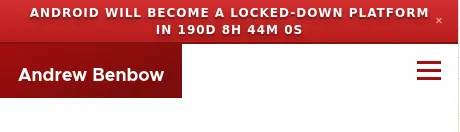
As you may have noticed when you landed on the web-version of this post, I have added a new banner to my website promoting the Keep Android Open project. It is a countdown to the theoretical end of openess and flexibility in the Android ecosystem.
Once it reaches 0, Google will disable sideloading of third-party apps. This includes downloading random APKs from the developer's website, sharing custom apps with your friends, and even using well-established alternative app stores like F-Droid. Instead, Android will only run apps written by developers who are registered with Google. So, even though the open source community and random well-meaning hackers and app developers dumped tons of free time and energy into making Android work, Google is essentially reserving the last call on what Android even is.
And let's be honest-- stock Android is essentially spyware. It takes a bunch of time and discomfort to strip away at all of the Googleness baked into it and get at the base system, which absolutely rocks. Though, it is possible.
I had to go to extreme lengths to get a version of Android that actually suits my needs and fits my moral and ethical views. Android isn't this magic bullet that will solve smartphones forever. But I belive it could have been.
Maybe it still could be.
The Keep Android Open website features an open letter to Google signed by some really big hitters in the Android app development and open source worlds, along with some small actions regular people like me can take to help. I'm not a developer for Android-- just an Android-enjoyer who cares about digital autonomy and wants people to have better defaults in their lives.
I've put the banner on my website as a way to help with these efforts. I hope you'll take the time to browse the website, read and share the open letter, and maybe write your lawmakers telling them your thoughts.
That link one more time is: https://keepandroidopen.org/
Footnotes
[1] I recently went to a cafe in a US National Park that didn't appear to have any waitstaff. Just a kiosk and two guys in the kitchen. You walk in, scan a QR code to get the menu, punch your order into the kiosk, and get a text when your food is on its way. One of the aforementioned kitchen guys would then appear with your food some time later, making the text alert seem somewhat irrelevant. One has to wonder how you would eat if you didn't have a phone?
[2] On a fresh install of Graphene, download F-Droid, then the Island app (from F-Droid). Using Island, set up a work profile, which, in Graphene is an isolated space even within your phone that you can toggle on/off as needed. Work apps can only see the applications, files, contacts, and other data that lives within the work profile. So you can keep your sensitive personal data in your main profile and out of range from apps that might want to snoop on them. When you have a work profile on your phone, GrapheneOS gives you a button that you can put on your dashboard or app launcher to toggle those apps on and off. When turned off, work apps are not allowed to run in the background, access any services, or start any processes, They're effectively not even there. Some launchers even hide them. Work apps usually have a little suitcase icon on top of them. Next, from within your work profile, locate the Graphene App store (work-version) and download Google Play Services, and the Google Play store. Don't log into the Google Play Store. Next, transfer F-Droid into your work profile (using Island, you can kind of just "clone" F-Droid from your main profile into the work profile). Then, in F-Droid (work version) download the Aurora Store, which allows you to download apps from the Google Play Store anonymously. Now, your work profile can be used to download and run any app that requires Google Play services. I mostly use it for banking apps which demand a very specific environment in order to work. When I'm done, I can toggle off my work account, effectively killing Google Play Services, all of those apps, and their ability to see anything on my phone. It's honestly the best solution I've found so far to be able to dance across both software environments in a safe way.


Comments